
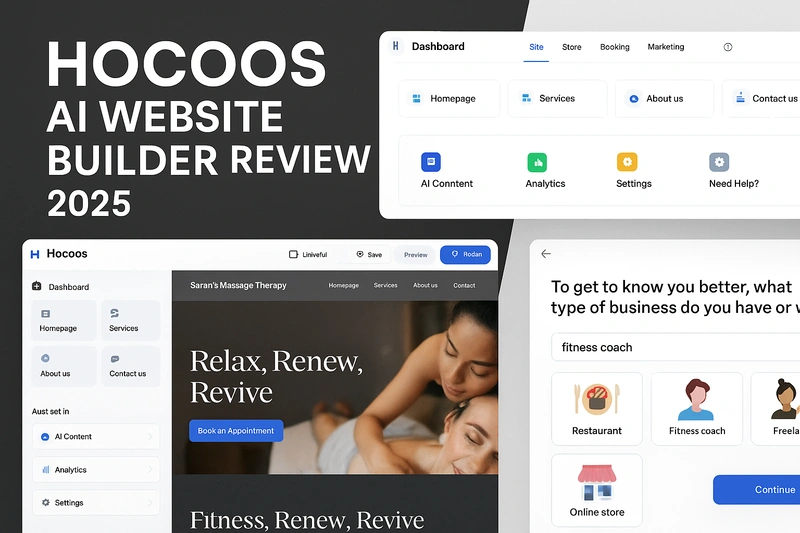
AI website builders are getting a lot of attention lately, especially from freelancers and small business owners who want to launch a website fast without hiring a developer. Among these tools, Hocoos is one of the newer names making bold claims—like building you a full website in minutes using just a short quiz.
No templates to choose, no drag-and-drop. You simply answer 8 questions, and Hocoos generates your homepage, inner pages, images, content, logo, and even a blog. On paper, it sounds like a dream for non-technical users.
But does it actually work? Can it create a decent website that’s good enough to launch? Or does it fall into the same trap as many other AI tools—lots of hype, little real value?
In this review, I’ll break down what Hocoos really offers, based on actual user feedback from Reddit, Trustpilot, and forums. I’ll also highlight real pros and cons, show where it makes sense to use it, and where you should probably look elsewhere.
✅ Quick Summary
If you’re in a hurry or just want the bottom line, here’s a quick overview of what Hocoos does well, where it falls short, what it costs, and who it’s best for. This is based on real user feedback from Reddit, Trustpilot, and hands-on walkthroughs.
Pros:
- Super fast setup — get a live site in under 5 minutes
- All-in-one AI toolkit (logo, content, blog, store, booking, email marketing)
- Affordable pricing at $15/month or $150/year
- Improved customer support, actively replies to negative reviews
- Great option for solo freelancers and service-based businesses
Cons:
- Limited design flexibility — no access to code or mobile view control
- Sites tend to look generic or templated
- No export or site backup options — you’re locked in
- Editing UI can feel clunky with multiple steps for simple changes
- AI sometimes skips important sections (e.g. bios, team pages)
Pricing:
- Free plan: test only, very limited features, no custom domain
- Premium plan: $15/month or $150/year — includes domain, full AI access, and integrations
Best For:
- Non-technical users who want a ready-made site fast
- Freelancers, consultants, and small business owners who just want to get online
Alternatives to Consider:
- Durable (faster, better AI design quality)
- Wix ADI (more design control)
- 10Web (WordPress-based with AI help)
- Framer AI (for more modern design flexibility)
💡 What is Hocoos?
Hocoos is an AI-powered website builder that helps you create a complete business website without needing any design or coding skills. You start by answering a short set of questions about your business, and based on your answers, it automatically generates your website’s layout, content, images, and even a logo.
It’s not just a basic landing page tool. Hocoos also includes features like blogging, ecommerce, appointment booking, SEO, and email marketing. This makes it more of an all-in-one platform for small businesses, freelancers, and solo entrepreneurs.
The goal is to save time and remove the overwhelm that usually comes with website building. Instead of dragging and dropping blocks or customizing templates from scratch, Hocoos does the heavy lifting for you. But like most AI tools, it’s not perfect, and there are a few important limitations you should know about before using it.
⚙️ How Hocoos Works (Step-by-Step Overview)
One of the main selling points of Hocoos is how fast and effortless the setup process feels. Here’s what actually happens when you start using it:
1. Answer 8 Quick Questions
As soon as you sign up, Hocoos asks you a few basic questions:
- What kind of business do you have?
- What’s your business name?
- What services do you offer?
- Where are you located?
- Do you want to include a store or booking system?
- Any preferred colors or design styles?
- Social media links, contact info, etc.
You just fill in your details—no technical terms, no design knowledge needed.
2. AI Generates Your Entire Website
Based on your answers, Hocoos automatically builds:
- A homepage
- Inner pages (like services, about, contact)
- Pre-written content and headlines
- Business-appropriate images
- A logo (if you don’t have one)
- Blog section
- Store or booking system (if selected)
Everything is done within a few minutes. You don’t have to select templates, adjust layouts, or even write copy.
3. Customize If Needed
After generation, you can:
- Change fonts, colors, and themes
- Swap out images or upload your own
- Edit any text directly on the page
- Add or remove sections using pre-built blocks
The editor is click-to-edit style, but some users report that making layout changes or finding certain settings can feel a bit clunky.
4. Add Tools & Publish
You can turn on:
- Appointment booking
- Online store (with PayPal or Stripe)
- SEO settings
- Email marketing
- Analytics
Once you’re ready, hit publish and your site is live—either on a free Hocoos subdomain or your own custom domain (if you’re on a paid plan).
🔍 Key Features of Hocoos
Hocoos tries to give you everything you need to launch a website and run a small business online—without using multiple tools. Below are the main features, explained in more detail based on real testing and user feedback.
1. AI Website Generator
This is the heart of Hocoos. You start by answering 8 basic questions about your business, and within minutes, the AI generates a full website. That includes a homepage, about page, service or product pages, contact form, and a few pre-filled inner sections.
The structure is designed for real-world use, especially for freelancers and small business owners. It’s fast and surprisingly accurate, but visually the sites can feel a bit generic. If you’re expecting a unique design or layout innovation, you might be underwhelmed. But for getting online quickly, it does the job.
2. AI Content & Blog Tools
Hocoos writes all the basic text for your site using AI. It fills in headlines, descriptions, service blurbs, and contact sections. There’s also an AI blogging tool that can help you generate blog posts directly from the dashboard.
The content is decent enough to publish, especially for simple service businesses. But like most AI-generated text, it may feel robotic or vague in some places. You’ll often want to tweak the tone, adjust details, or rewrite certain sections to make it more personal or accurate.
3. Logo & Image Generator
If you don’t already have branding, Hocoos can generate a basic logo using AI. It also picks relevant images for each section of your site. The visuals are styled to match your business type, though they often feel like stock images rather than custom designs.
The logo tool is very basic—fine for placeholders or early-stage businesses, but not ideal if branding matters a lot to you. You can upload your own logo and photos if you prefer.
4. Online Store & Booking System
This is one of Hocoos’ stronger features. If you enable the store, it sets up product pages, a shopping cart, and payment options (Stripe or PayPal). It’s simple, but good enough for selling physical or digital products.
If you’re a service-based business, the booking system lets customers schedule appointments directly from your website. This is useful for coaches, salons, consultants, or anyone offering sessions or calls.
It’s not as advanced as tools like Calendly or Shopify, but it works well for basic needs.
5. Built-in SEO & Marketing Tools
Hocoos automatically adds SEO titles, descriptions, and meta tags during site creation. You can also update them manually if you want more control.
There’s a simple analytics dashboard, contact forms, and a basic email marketing tool included. It won’t replace full platforms like Mailchimp or Google Analytics, but it’s enough to get started with lead capture and list-building.
This feature is especially helpful for beginners who want something that just works out of the box without setting up separate tools.
✅ Real Pros of Hocoos (From Users & Testing)
After going through real user reviews on Reddit, Trustpilot, and independent tech sites, here are the key strengths of Hocoos that actually matter in real-world usage:
1. Extremely Fast Website Creation
Hocoos truly delivers on speed. You can go from signup to a full website in just a few minutes. There’s no need to browse templates, write content, or design anything from scratch. For non-technical users or anyone in a rush, this is one of the most appreciated features.
2. All-in-One Toolkit for Beginners
Unlike many AI website builders that only give you basic design features, Hocoos includes everything in one place: AI content writing, logo creation, blogging, booking, ecommerce, SEO, and even email marketing. You don’t need to connect third-party tools or deal with plugins, which makes it ideal for beginners or solo entrepreneurs.
3. Surprisingly Decent Content Out of the Box
Several users mentioned that the AI-generated text was better than expected. While it still needs minor tweaks, it gives you a solid base to start with—especially if you’re building a basic business site and aren’t sure what to write.
4. Great for Small Service-Based Businesses
The built-in booking and service page setup works well for coaches, freelancers, consultants, wellness practitioners, and local businesses. The structure is focused on action: showcasing your offer and making it easy for users to book or buy.
5. Affordable Premium Plan
At $15 per month or $150 per year (with a free domain included in the first year), Hocoos is cheaper than most popular builders like Wix or Squarespace. You get full access to all tools, and there are no confusing upgrade paths or hidden upsells.
6. Support Quality Has Improved
Earlier reviews complained about poor customer support, but newer Trustpilot reviews show the Hocoos team is now more responsive. They reply to almost all negative reviews and provide basic tutorials and email support that’s helpful for most new users.
❌ Real Cons of Hocoos (From Users & Testing)
While Hocoos offers speed and simplicity, it’s not without its downsides. These are the most common complaints and limitations mentioned by real users across Reddit, Trustpilot, YouTube, and independent reviews.
1. Designs Look Generic and Repetitive
One of the most frequent complaints is that websites created with Hocoos tend to look very similar. The AI uses a limited number of layout structures and blocks, so most sites follow the same format with only small visual changes. If you care about having a unique brand presence, this will likely be a dealbreaker.
2. Limited Customization Options
You can change colors, fonts, images, and sections, but beyond that, customization is very restricted. There’s no access to code or custom CSS. You also can’t control the mobile layout or create truly flexible page designs. Power users will find it frustrating very quickly.
3. Editing Experience Feels Clunky
The editor works, but it’s not the smoothest. Some users report that simple layout adjustments take too many clicks, and finding certain settings can feel confusing. If you’re used to builders like Webflow, Framer, or even Wix, the Hocoos editor may feel slow and limiting.
4. No Export or Backup Option
This is a major downside. Once you build a site with Hocoos, you’re stuck with it. There’s no way to export your site files, download a backup, or move your content to another platform. If you ever decide to leave, you’ll need to rebuild everything from scratch elsewhere.
5. AI Content Sometimes Misses Key Sections
While the auto-generated text is decent for surface-level info, it often skips important elements like team bios, testimonials, or service variations. You’ll need to manually add these yourself if you want a more complete website.
6. Reports of Phishing or Spam Sites Using Hocoos
A few users on Trustpilot mentioned that some scammy or phishing websites were hosted using Hocoos, and there’s no visible abuse reporting system. While Hocoos does respond to these reviews, this kind of misuse could hurt its credibility over time.
💰 Hocoos Pricing Breakdown
Hocoos keeps things simple with just two plans: one free and one paid. While the free plan gives you a feel for how the platform works, it’s not meant for real-world use. If you actually want to launch a site, you’ll need the premium plan. Thankfully, it’s reasonably priced and includes everything upfront—no confusing upsells or feature gates.
Here’s a side-by-side breakdown of both plans:
| Feature | Free Plan | Premium Plan ($15/month or $150/year) |
| Website Access | Can build and preview site | Full access with publishing |
| Domain | Hocoos subdomain only | Free custom domain (1st year) |
| AI Tools | Limited use | Unlimited (content, blog, image, logo tools) |
| Hocoos Branding | Visible on all pages | Removed |
| Ecommerce & Booking | Not available | Full access to store and appointment tools |
| Blog Feature | View only | Can publish and manage posts |
| SEO Tools | Limited or locked | Full access (edit titles, descriptions, etc.) |
| Email Marketing | Not included | Included (basic lead capture and broadcast emails) |
| Hosting & Security | Included (Hocoos domain only) | Included (with SSL and full site hosting) |
| Support | Basic access | Priority support and tutorials |
🔍 Hocoos vs Other AI Website Builders
There are now several AI website builders in the market, each with a slightly different approach. Hocoos focuses on speed and simplicity, but how does it compare to other popular tools like Durable, Wix ADI, 10Web, and Framer AI?
Here’s a quick comparison to help you understand where Hocoos stands out and where it falls short.
Side-by-Side Comparison
| Feature | Hocoos | Durable | Wix ADI | 10Web AI | Framer AI |
| Setup Speed | Under 5 mins with quiz | 1-click, auto-generates fast | Fast, but more steps | Slightly longer (WordPress setup) | Fast, but more design-focused |
| AI Content | Generates full pages & blog | Home, about, services | Basic filler content | Generates content based on prompts | Requires more manual writing |
| Design Quality | Clean but templated | Minimal and modern | Template-based | WordPress themes with AI layout | High-end visual design |
| Customization | Limited (no code, basic edits) | Very limited | Moderate (within ADI) | Good if using Elementor | High flexibility (needs design sense) |
| Ecommerce/Booking | Included (simple tools) | Store only (no booking) | Add-ons required | Strong WooCommerce integration | Requires third-party tools |
| SEO & Marketing | Built-in SEO, email, analytics | Basic SEO only | Basic SEO | Full SEO control via WordPress | Limited SEO features |
| Export Option | No export | No export | No export | Full WordPress access | Export to custom hosting possible |
| Best For | Fast launch for non-tech users | Ultra-fast MVP sites | Casual users or small personal sites | WordPress users wanting AI help | Designers & creatives needing polish |
| Pricing (Annual) | $150/year | $144/year | ~$168/year (Combo Plan) | $120/year (Starter) + WP hosting | $180/year (Pro Plan) |
🧩 Who Should Use Hocoos (and Who Shouldn’t)
Hocoos is not trying to be everything for everyone. It’s built for speed, simplicity, and getting a business online fast. Based on real user feedback and hands-on research, here’s who will benefit from using Hocoos—and who might be better off with something else.
✅ Hocoos is a Good Fit For:
- Freelancers and consultants who just need a professional-looking site up quickly
- Service-based businesses like coaches, salons, tutors, and local professionals that want built-in booking tools
- Non-technical users who don’t want to mess with drag-and-drop builders, plugins, or complex settings
- Side hustlers or first-time founders who are launching something small and need a clean, working site fast
- Budget-conscious users looking for an all-in-one setup under $15/month, without upsells or multiple tools
🚫 Hocoos is Not Ideal For:
- Designers or developers who want full control over layout, styling, or mobile responsiveness
- Brands that care about uniqueness or strong visual identity, since most Hocoos sites look similar
- Anyone who may want to export or migrate their site later, because Hocoos doesn’t support site export
- Content-heavy businesses, like media sites or e-learning platforms, that need advanced structure and flexibility
- Power users who prefer WordPress, Webflow, or Framer for deep customization and long-term scalability
🧭 Alternatives to Consider
If Hocoos feels too limited or doesn’t match your business needs, here are a few other AI website builders worth considering. Each has its own strengths depending on what you’re looking for.
1. Durable
One of the fastest AI site builders available. You can generate a full site in seconds with just your business name. The design is modern and minimal, but customization is even more limited than Hocoos. Best for MVPs and landing pages.
Best for: Speed-focused users and quick MVP testing
Weakness: Extremely limited editing control
2. Wix ADI
Wix’s AI builder offers a balance between automation and manual control. It asks questions and then builds your site, but you can still use Wix’s traditional editor afterward. A good middle ground if you want more flexibility than Hocoos.
Best for: Users who want easy setup with room to grow
Weakness: Editing experience can feel bloated or confusing
3. 10Web AI
Built on WordPress, 10Web uses AI to generate a full WP-based site with Elementor. It’s a bit more technical but gives you full ownership, export options, and powerful plugins.
Best for: Users who want AI speed without giving up WordPress control
Weakness: Slightly steeper learning curve, requires separate hosting
4. Framer AI
Great for visual designers and creative brands. You get AI-generated sections and layouts, but also full design freedom. It’s not as beginner-friendly, but the results look premium.
Best for: Designers and portfolio-style websites
Weakness: Not ideal for non-designers or local service businesses
🧠 Final Verdict: Is Hocoos Worth It?
Hocoos does exactly what it promises — it builds a working website in just a few minutes with almost zero effort. If you’re a solo entrepreneur, freelancer, or small service business that just needs something simple and professional-looking, Hocoos is a solid option.
The setup is fast, the tools are all in one place, and the pricing is straightforward. You don’t have to worry about themes, plugins, or integrations. It’s a good choice if you want to focus on your business, not your website.
But if you care about custom design, long-term flexibility, or owning your site fully, you’ll likely run into limitations. The lack of export, limited customization, and generic design output are things to seriously consider.
Use Hocoos if:
You want to get online fast without hiring anyone or learning how to build a website.
Avoid it if:
You need full creative control, unique branding, or want the option to move your site later.
❓ Frequently Asked Questions (FAQ)
These are the kinds of questions real users ask before deciding to use Hocoos. The answers are short, clear, and based on actual testing and public info.
Can I export my website from Hocoos later?
No, Hocoos does not offer any export or backup option. If you leave the platform, you’ll need to rebuild your site from scratch elsewhere.
Is the free plan usable for a real website?
Not really. The free plan is meant for testing only. It includes Hocoos branding, no custom domain, and very limited functionality. You’ll need the premium plan to launch a proper site.
Is the content really written by AI?
Yes. Hocoos uses AI to generate page content, service descriptions, headlines, and blog posts. The output is decent for basic use, but you’ll likely want to edit it for clarity or branding tone.
Can I use Hocoos to run a store or booking system?
Yes. Hocoos includes both a simple ecommerce setup (with Stripe and PayPal) and a booking feature for service-based businesses. These tools are built-in and don’t require third-party plugins.
How good is the customer support?
It has improved recently. While early reviews mentioned slow replies, current users report helpful responses and clear email support. Hocoos also actively replies to negative reviews on Trustpilot.
Is the design mobile-friendly?
Yes, sites built with Hocoos are responsive by default. However, you don’t have direct control over the mobile layout, which may be frustrating if you want custom mobile tweaks.