
Framer AI has been making a lot of noise lately, especially among designers and freelancers looking to build clean, modern websites without touching a line of code. With its slick interface, AI-assisted layout generation, and pixel-perfect design control, it seems like a dream tool for visual creators.
But is it really that good? Or is it another overhyped builder where the AI does half a job and leaves you frustrated?
In this review, we’re cutting through the fluff and looking at what Framer actually offers, based on real user feedback, Reddit discussions, and hands-on tests. We’ll walk through its features, pricing drama, AI performance, and compare it with other top tools so you can decide if it’s worth your time (and money).
Let’s break it down.
What is Framer AI?
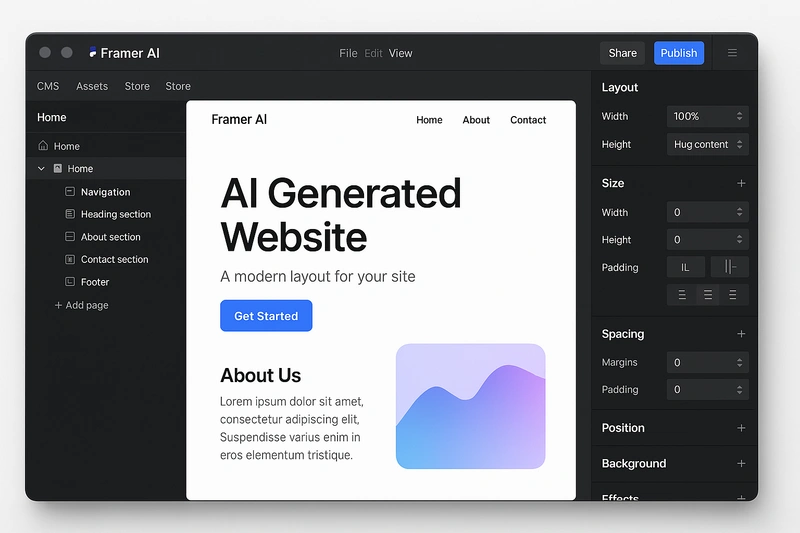
Framer is a visual website builder made for designers. It gives you full control over layout, animations, and interactions without needing to write code. If you’re comfortable with tools like Figma, Framer will feel familiar. You design on a canvas, tweak styles in side panels, and publish the site directly from the editor.
Framer AI is a feature inside the platform that helps you kickstart a website using simple text prompts. You can describe the kind of site you want, such as “a modern portfolio for a UX designer,” and it will generate a basic layout based on that input. It won’t deliver a fully polished website, but it’s useful for getting a rough structure in place.
Unlike tools like Durable or 10Web that aim to give you a complete website in one go, Framer’s AI acts more like a creative starting point. You’ll still need to adjust layouts, edit sections, and add your own content. This makes it a better fit for designers or visually skilled users rather than total beginners.
Feature Walkthrough (Detailed Breakdown)
Framer isn’t trying to be a simple drag-and-drop tool for beginners. It’s more like a design playground built for people who care about layout, motion, and custom control. Here’s how each of its key features actually performs in real use:
1. Drag-and-Drop Editor
Framer’s editor feels like Figma came to life. You can move elements freely on the canvas, control spacing down to the pixel, and layer components exactly how you want. There’s no rigid grid system forcing you to stay inside boxes.
This gives you a lot of creative freedom, but it also assumes you know what you’re doing. If you’re used to template-based builders, the blank canvas might feel overwhelming at first. You’re building the site like a designer, not filling in blocks like a blogger.
2. AI-Powered Layout Generator
The “Start with AI” feature lets you generate a base layout by typing a simple prompt. For example, you could say “a clean portfolio site for a UX designer with an about section and contact form.” Framer then builds a basic structure with placeholder content.
Here’s the catch — that structure is usually very generic. The design is decent, but not polished. You’ll still need to rework most sections to make it usable. So don’t expect something like Durable, which gives you a fully generated site with copy and images.
The AI is helpful to avoid starting from a blank canvas, but it won’t save you from designing.
3. Animations and Interactions
This is where Framer stands out. You can create transitions, scroll effects, hover animations, and dynamic elements without writing code. The editor gives you a timeline-based system where you can fine-tune motion and easing.
It’s powerful enough to make your site feel modern and interactive, which is why a lot of designers use Framer for portfolios or landing pages. Unlike most builders, you’re not limited to simple fade-ins. You can build real motion design that feels custom.
4. Responsive Design
Framer gives you manual control over breakpoints. You can switch to mobile, tablet, or desktop views and adjust each one independently. This means you can reposition or resize elements for each screen size instead of relying on auto-resize rules.
The upside is flexibility — your mobile layout doesn’t have to look like a squished version of the desktop site. The downside is that you have to manage responsiveness yourself, which might slow things down if you’re not used to doing it.
5. Custom Code and Embeds
Need to add a booking form, calendar, or chatbot? Framer lets you embed HTML, CSS, and JavaScript blocks directly into the layout. You can also insert third-party widgets or analytics scripts in the page or site settings.
For developers, there’s a full code export feature. You can take your design and get clean React code out of it, which is rare in no-code tools. That makes it useful in team environments where designers and developers are collaborating closely.
6. SEO Tools
Framer includes basic SEO settings like page titles, meta descriptions, alt text for images, and a built-in sitemap. You can also set up Open Graph previews so your site looks good when shared on social platforms.
It’s good enough for simple sites, but it’s not built for deep SEO work. You won’t find plugin-style controls like Yoast, structured data tools, or automatic meta-tag generation for large content sites. Also, on lower-tier plans, there are restrictions on how many pages can be indexed, which has frustrated some users.
Real Pros (Based on Reddit + User Reviews)
Framer might not be for everyone, but if you’re a designer or someone who values full creative control, it offers a lot of strong points. Here’s what real users actually love about it:
✅ Feels like Figma, but for live websites
Framer’s editor is made for designers. It works like Figma but with the power to publish. You’re not stuck in rigid blocks or limited grids. You can drag, resize, tweak spacing, layer things visually, and customize layouts with real precision.
For anyone already familiar with Figma or Sketch, the learning curve is minimal. Several Reddit users said they were able to build and publish within hours because the workflow felt so familiar.
✅ Modern design out of the box
Even if you don’t touch the animations or go deep into customization, Framer’s defaults still look sharp. The fonts, spacing, and visual hierarchy feel clean and high-end.
Unlike tools like Wix, where you often need to fight against outdated templates, Framer gives you a starting point that already looks premium.
That’s why it’s commonly used for portfolios, landing pages, and SaaS marketing sites where aesthetics really matter.
✅ Animations and motion made easy
One area where Framer stands out is motion design. You can build things like scroll-based effects, hover transitions, entrance animations, and even complex timelines using a visual editor.
No JavaScript or plugins required. Just drag and adjust.
Designers love that they can finally add interactivity without involving a developer. This is especially helpful for branding-heavy websites that want to stand out.
✅ Instant publishing and hosting
Framer handles hosting for you. Once you design your page, just click “Publish” and it goes live instantly. There’s no need to deal with external hosting, domain setup (unless you want to), or complicated deployment steps.
You also get built-in SSL, fast CDN delivery, and reliable uptime performance.
✅ Custom code and React export
If you’re working with a developer, Framer lets you insert HTML, CSS, or JavaScript blocks directly into the page.
You can also export the full project as React code. This makes Framer a rare hybrid. It’s a no-code tool on the surface, but still developer-friendly underneath.
✅ Great for solo creators and freelancers
Many indie devs and freelancers on Reddit say Framer helps them create quick MVP websites or personal sites without depending on developers.
You don’t need to be technical, but if you have some design experience, you’ll get a site up quickly — and it will actually look good.
✅ Helpful community and templates
There’s a growing ecosystem of Framer templates, community resources, and user-made components. While it’s not as big as Webflow’s, it’s enough to speed up your workflow and get design inspiration.
Reddit users mentioned that Framer’s Discord and tutorial content have improved over time, even though the onboarding still isn’t very beginner-friendly.
✅ Built-in SEO basics
You can edit meta titles, descriptions, alt text, and social sharing previews. Framer also generates a sitemap automatically and supports clean URLs. This is good enough for small to mid-size websites.
Real Cons (No Sugarcoating)
Framer has a lot going for it, but it also comes with real limitations and frustrations — especially if you’re not a designer or if you’re expecting the AI to do most of the work. Here’s what actual users are complaining about on Reddit, Trustpilot, and review platforms:
❌ The pricing feels punishing
This is the biggest pain point for most users. Framer charges extra for everything — multi-language support, extra editors, and even how many visitors or indexed pages you get.
For example, if you want your site in two languages, that’s around $40 extra. Need a second editor? That’s another $15 per month.
Multiple Reddit threads have called the pricing model “overcomplicated” and “user-unfriendly.” It’s especially tough on agencies or users managing more than one site.
❌ The AI is underwhelming
Yes, there’s an AI tool that lets you start with a prompt. But in reality, it creates a very basic wireframe with placeholder content.
You’ll have to edit every section, redesign layouts, and rewrite the text. It’s helpful to avoid a blank canvas, but don’t expect anything close to Durable or even 10Web in terms of “done-for-you” results.
❌ Not for beginners
Framer looks beautiful but has a learning curve. If you don’t have experience with design tools, the freedom it gives can feel overwhelming.
There are no onboarding wizards, no structured templates, and no drag-to-fit sections like in Wix or GoDaddy.
Even Reddit users who love Framer have admitted that it’s not easy for non-designers or small business owners without creative skills.
❌ No real CMS for content-heavy sites
If you want to run a blog, publish regular articles, or build a large content hub — Framer is not built for that.
It lacks dynamic CMS features, collections, tagging, or post templates. You’d have to manually create each blog post as a standalone page, which gets messy fast.
❌ Poor client handoff flow
Agencies and freelancers have pointed out that handing a Framer site over to a client is frustrating.
There’s no proper live editing role for clients, and many resort to weird workarounds using Notion or Google Sheets.
Clients can’t log in and edit their own content easily, which defeats the purpose for many small business sites.
❌ Limited integrations and extensions
Compared to platforms like Webflow, WordPress, or even Wix, Framer has fewer third-party plugins or native integrations.
You can embed custom code, but you won’t find built-in form builders, booking tools, or payment processors. That means more work if your project needs anything beyond static pages.
Pricing Breakdown
Framer’s pricing isn’t just about picking a monthly plan — it’s layered with extra costs depending on what features you need. While the base plans seem competitive at first, many users on Reddit and review sites have called out the pricing structure as confusing and restrictive.
Here’s how it really works:
Base Plans (As of 2025)
| Plan | Price (Monthly) | Key Limitations |
| Free | $0 | Framer branding, limited pages, no SEO indexing |
| Mini | $5/month | Basic custom domain support, no localization |
| Basic | $20/month | Visitor limit (~1k/month), limited pages |
| Pro | $30/month | Up to 10k visitors, 150 pages, still limited SEO indexing |
| Business | $60–80/month | Unlocks more visitors, indexing, and access to localization |
Note: You pay extra per language, per editor, and sometimes for visitor spikes. These add up fast.
Real Complaints from Users
- Language Support Is Expensive
Want to add one more language? That could be $40/month extra. Localization isn’t included in most plans unless you upgrade to Business. - Editor Access Isn’t Free
Need to give someone else access to your site? That’s $15/month per editor — even if they’re only making small changes. - SEO Indexing Caps
On lower-tier plans, only a small number of pages can be indexed by search engines. For many, this defeats the point of building a proper website. - Pricing Shocks at Checkout
Many Reddit users reported being surprised by how quickly the price jumped once they started adding team members, languages, or traffic upgrades. The base price is rarely what you’ll end up paying.
Is It Worth the Cost?
If you’re a solo designer building one high-quality site, the Pro plan might be enough — but for agencies, content creators, or multilingual businesses, Framer becomes expensive fast.
Framer AI vs Other Website Builders
If you’re not sure whether Framer is the right fit, this quick comparison shows how it performs against other top tools like Durable, 10Web, Webflow, and Wix ADI.
| Feature / Tool | Framer AI | Durable | 10Web | Webflow | Wix ADI |
| Ease of Use | ❌ Steep for beginners | ✅ Extremely beginner-friendly | ✅ Beginner-friendly | ❌ Complex for non-designers | ✅ Easy and guided |
| AI Output Quality | ⚠️ Basic layout, needs editing | ✅ Full site in 1 click | ✅ Decent WP-based results | ❌ No AI builder | ⚠️ Limited suggestions |
| Design Flexibility | ✅ Very high (Figma-style) | ❌ Very limited | ⚠️ Medium (Elementor-based) | ✅ Pro-level design tools | ✅ Customizable sections |
| Built-in CMS | ❌ Very limited | ❌ None | ✅ WordPress CMS | ✅ Full CMS and collections | ⚠️ Basic blog only |
| Client Handoff | ❌ Not user-friendly | ✅ Simple link sharing | ✅ WP admin access | ✅ Editor roles and permissions | ✅ Has limited roles |
| Pricing (Starter) | $20–30/month | $15/month | $10/month (annual) | $14–29/month | Free – $16/month |
| Best For | Designers & visual freelancers | Solopreneurs & local businesses | WP users who want AI help | Design/development agencies | Small businesses & beginners |
Who Should Use Framer (And Who Should Avoid It)
Framer isn’t trying to be the right tool for everyone. It’s designed with a specific type of user in mind — and if you fall outside that group, your experience might be frustrating. Here’s a realistic breakdown.
✅ Framer is a Great Fit If You Are:
🎨 A Designer or Figma Power User
You’ll feel right at home with Framer’s canvas. It gives you the creative control you expect, with layout freedom, pixel-perfect spacing, and animation tools that feel native to design workflows.
👨💻 A Freelancer or Indie Creator
If you build one-off landing pages, portfolios, or startup sites and want full visual control without code, Framer gives you just that. Plus, the built-in hosting and fast publishing make it easy to go live quickly.
🧠 Someone Comfortable with Visual Tools
If you’ve used tools like Webflow, Sketch, or Adobe XD, Framer will feel intuitive. It’s built for users who want to “design first” and tweak freely.
❌ Framer Might Not Be for You If You Are:
🚫 A Total Beginner Looking for a Done-for-You Site
If you’re hoping the AI will magically build your full website — this isn’t it. The AI helps start things, but you’ll be doing most of the layout and content work yourself.
📝 Running a Blog or Content-Heavy Website
Framer lacks proper CMS features. Publishing blog posts or managing a large content library is painful and inefficient. You’re better off with WordPress or Webflow.
📦 An Agency Needing Client Handoff
There’s no clean way to give clients editing access without extra costs and awkward workflows. If client handoff is part of your process, Framer will create friction.
🌍 Managing Multi-Language or High-Traffic Sites
The extra costs for localization, page indexing, and visitors stack up quickly. Other platforms offer more scalable pricing and infrastructure for these needs.
Final Verdict
Framer AI is not your typical website builder. It’s not trying to be the easiest, the cheapest, or the most beginner-friendly option. What it does offer is something more powerful — a clean, flexible, design-first tool that gives creatives full control over how their website looks and feels.
If you’re a designer, especially someone who lives in Figma, Framer will feel like home. The animations, the responsive editor, and the ability to publish exactly what you designed — all of it makes sense for visual thinkers.
But if you’re someone looking for a quick AI-built website with minimal effort, Framer is going to disappoint you. The AI is just a starting point, not a done-for-you solution. And once you add up the pricing quirks — from localization to editor access — it can feel expensive fast.
So here’s the simple take:
Framer is for creatives who want control. Not for beginners who want shortcuts.
If that sounds like you, it might just become your new favorite tool. If not, there are better options out there.
Framer AI Alternatives You Can Consider
If you like the idea of building a site with AI but feel Framer is too complex, too expensive, or not quite the right fit, here are a few alternatives worth looking into:
✅ Durable
Probably the easiest AI website builder out there. You just enter your business name and industry, and it creates a working site in seconds.
Great for: Solopreneurs, local businesses, and people who want a live site fast without any design work.
✅ 10Web
Blends AI with WordPress. It gives you a full WordPress site using AI, with Elementor as the visual builder.
Great for: Users who like WordPress flexibility but want a faster way to start.
✅ Wix ADI
Wix’s AI builder is simple and beginner-friendly. It guides you with questions and builds a styled layout you can then tweak using Wix’s drag-and-drop editor.
Great for: Small business owners and beginners who want ease without coding.
✅ Webflow
Webflow isn’t an AI builder, but it’s a strong Framer alternative for professionals. It has a real CMS, better client handoff features, and stronger support for dynamic websites.
Great for: Agencies, developers, and power users who want full control and scale.
FAQ – Framer AI Review
Q: Can I export my Framer website to another platform?
You can export your project as React code, which is useful if you’re handing it off to developers. However, there’s no direct way to export a static HTML version or migrate it to WordPress or another builder.
Q: Is Framer good for SEO?
For small sites, yes. It supports basic SEO features like meta titles, descriptions, alt text, clean URLs, and sitemap generation. But it lacks advanced controls, plugins, or structured data options for larger SEO-focused sites.
Q: Can clients edit their own website in Framer?
Not easily. There’s no built-in CMS or editor role that allows non-designers to make safe content edits. Many freelancers use workarounds like Notion or Google Sheets, but it’s not ideal for client handoff.
Q: Does Framer support blogs or content-heavy sites?
Not really. Framer doesn’t have a proper CMS. You’d have to manually build and duplicate each page, which becomes painful for anything beyond a small static site.
Q: How does Framer compare to Webflow?
Framer is more design-focused and feels smoother for animations and layout editing. Webflow, on the other hand, offers a true CMS, better scalability, stronger client handoff, and more integrations.
If you’re a designer building one site, Framer might feel cleaner. If you’re running a content-driven or client-facing operation, Webflow is more complete.